
When it comes to producing the next banger for your arsenal, the last thing most producers would think about is how to actually start your song in a way that lets you finish successfully.
I know countless producers who experience a point in their productions where they slam head first into that brick wall of writers block. We have all been at this point and sometimes it can be so frustrating we give up on the song completely! If this has ever happened to you, you are not alone, and yes, you will finish a song again!
How many producers do you know that seem to have loads of “works in progress” where they never actually finish anything?
These artists are likely suffering from the phenomenon called writers block. The motivation and drive are present, but the ideas are not going on paper in a way that conveys your message.
The saying goes “The Devil Is In The Details” and in my personal experience, this applies tenfold to Ableton live.
Today I want to share with you a few techniques I use to combat writers block before it begins. You may have techniques and processes that help you in this area, and I encourage you to share them below to help out your fellow producers who may have difficulties.
First thing is first, as the title implies, it seems most beneficial to set yourself up correctly from the word go. This includes calculated and planned track grouping, and project template structure. For example, I know that I am going to probably use a reference track in my productions, so I will immediately set this up like so:

As unimportant as this seems, I was most surprised when I found that lots of producers do not even use a reference track to ensure the quality of their own songs.
If you like, you can also add color to the track. To that same end, I may use some white noise or other objects for a static side chain effect depending on the track. (A technique picked up from Bassgorilla.com!)
So comes the question, what to do with these elements, as they do not fit within your average musical track groupings? (Basses, Atmosphere, Leads, etc.)
Ableton Live Organization Tips
In an effort to stay organized, I find it beneficial to group these tracks into a group titled “Guides”. This helps me to have less floating elements with nowhere to go. To expand upon this, I will also add two more Midi Tracks to this group. One for Scale, and one for chords, like so:
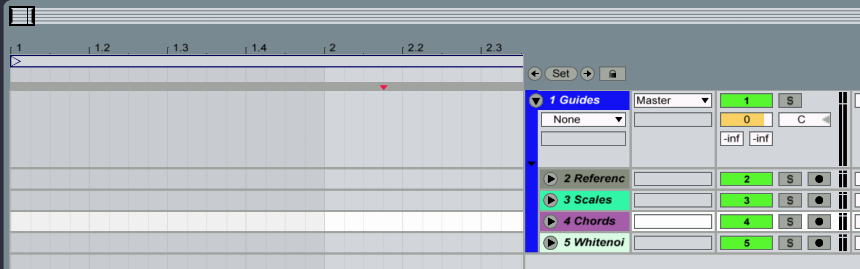
It is vastly beneficial to be able to reference these at any point , especially when you hit “the wall”. You now add your scale and chord mini notes, and you can quickly see the notes and chords you can use to continue your production.
I don’t know about you, but the last thing I want to do in the middle of designing awesome grooves or destructive drums and bass is look up what notes I can and cannot use to go with the song.
Top this off with the sometimes unreliable internet, and you may not even be able to know what those are!
Another added bonus is the ability to option – Drop your midi clips to a new track at any point. (Alt – Click on a PC) Another technique I have recently started using is the edit info text command.
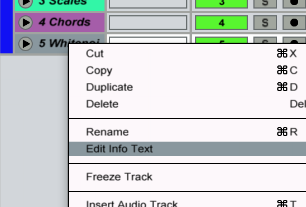
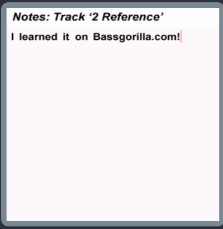
By right clicking or control click on mac, you can select the option Edit Info Text. Utilizing this command will let you be able to jot down notes on selected clips or tracks. You can use this to keep your ideas organized with side notes for the selected clips and tracks.
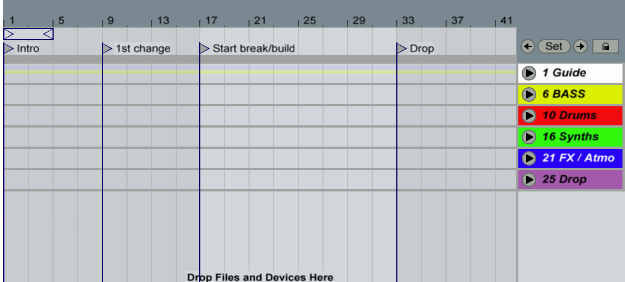
Another tool is to utilize the built in track markers in Ableton live for accurate representation of your various song sections. Sometimes when you visually see the actual placement and structure of your songs elements, it helps you to stay on track and follow a direction. I make Dubstep, so my track will usually look something like this-
To make the time you spend producing more well, productive, it is important to stay organized. These are a few tools that took me some time to discover, and hopefully you are able to apply them to your own productions. Remember to share your ideas below, as I can guarantee someone will benefit from them, as you may have from this one. Happy producing!
To show this content you have to accept our cookies.
I really like that dub step template.
What sort of things would one see in a template for Neurohop or Neurofunk?
You could see a similar type of organization but instead of a specific “drop” It could be some thing like marks for where the song begins to pick up or get more intense seeing as how there is not usually a definitive “drop”